Introduction to Functions
Before getting started, make sure that you're familiar with Sublime Text. Make sure you download a new project for today's lesson (explained in the previous link).
Lesson
Exercises
Basic Requirements
In the console on the blank
index.htmlpage, try the following and verify that the results match your expectations:square(10) + 2; square(100) + square(77); square(8 / 2) square(2 + 17); square(square(15));Write a sentence in plain English describing how
square(square(15))is evaluated.Rename the parameter to
squarein yourmain.jsfile tomonkey, and rename the uses of that parameter in the body tomonkeyas well. Will the functionsquarestill work? Why or why not?What is wrong with the following definitions of
square? Write a sentence or two describing the issue(s); then, try copying the erroneous examples into a console one-at-a-time and observing the error(s) generated (you may have to attempt to invoke the functions to see the error). What errors are produced (if any) for each erroneous version? Do the errors make sense?function square(monkey) { return x * x; } function square(5) { return 5 * 5; } function square("x") { return "x" * "x"; }Fix the invalid syntax in the following functions (you can copy and paste these invalid definitions into
main.jsand then edit them there):func square1(x { return x * x; } functionsquare2 x) return x * x; } function (x) square3 { return x * x;The following functions exhibit poor style -- fix these issues using the original version of
squareas a reference.function square(x){return x*x;} function square (x) { return x *x; } function square(x) { return x * x; }Complete the function
cubethat returns the cube of x:
function cube(x) {
            // your code here
          }
- Complete the function
fullNamethat should take two parameters,firstNameandlastName, and returns thefirstNameandlastNameconcatenated together with a space in between.
// don't forget the parameters!
          function fullName() {
            // your code here
          }
          fullName("John", "Doe") // => "John Doe"
Write a function
averagethat takes two numbers as input (parameters), and returns the average of those numbers.Write a function
greeterthat takes a name as an argument and greets that name by returning something along the lines of"Hello, <name>!"Using the document found at this link, translate the first page of geometric formulas into JavaScript functions.
As an example, a function to compute the perimeter of a rectangle might look like this:
function perimeterRect(l, w) {
            return 2 * (l + w);
          }
NOTE: JavaScript provides some nifty mathematical functions and constants built into the language that you'll need for this exercise. The two that we'll be making use of are:
Math.PI; // => 3.141592653589793
          Math.sqrt(256); // => 16
To test your answers, you'll need to:
- Save the JavaScript file that you enter your code into,
- Reload the corresponding
index.htmlfile (the one in the same directory as themain.jsfile that your code is in), - Call the function with arguments in the console to see the result, e.g.
perimeterRect(2, 6). - Eventually, you may want to verify that the output is correct. Google is a great tool for this:

More Practice
Translate the rest of the geometric formulas found here into JavaScript functions.
Advanced
Compound interest can be calculated with the formula:
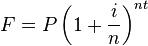
- F: future value
- P: present value
- i: nominal interest rate
- n: compounding frequency
- t: time
Write a function futureValue that can be used to calculate the future value
of a quantity of money using compound interest.
Use the function to calculate what the future value of $1700 (P = 1700)
deposited in a bank that pays an annual interest rate of 4.7% (i = 0.047),
compounded quarterly (n = 4) after 6 years (t = 6) (you can use Math.pow
to do exponentiation).
Write a
powerfunction that accepts the parametersbaseandexponentand returns the result. Replacesquareandcubewith thepowerfunction you just wrote. Do not useMath.pow.Write your own square-root function called
sqrtthat accepts anumberparameter and returns an approximate square root. Square-root approximations make use of averages. Be sure to use theaveragefunction you previously wrote. The first version of your square root function should perform no more than 3 successive averages.